- Version
- 1.0.1
- Android
- 5.0+
- Updated
- May 14, 2023
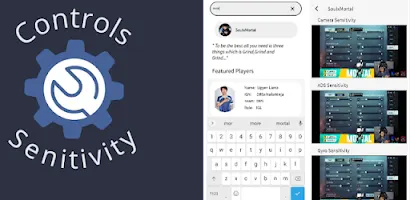
This app lets you see the controls and sensitivity of your favourite PUBG, BGMI and Game for Peace players. Don't worry also you can see the control and sensitivity of all the competitive players and top framers. You can make your controls by seeing the layout of competitive players and also adjust your sensitivity according to your favourite player.
Screenshots


What’s new in v1.0.1
Minor bug fixes
Latest changes
About Controls and Sensi(PUBG/BGMI) Latest Version
PlayerUnknown's Battlegrounds (PUBG) and its mobile counterpart Battlegrounds Mobile India (BGMI) have taken the gaming world by storm, offering intense battles and strategic gameplay. In these games, mastering the controls and sensitivity settings is crucial for success. Whether you're a seasoned player or just starting, understanding these aspects can greatly enhance your performance and overall experience.
The Basics of Controls
Before diving into sensitivity settings, let's first cover the basic controls that every PUBG/BGMI player should be familiar with:
- Movement:
- Use the left side of the screen to control movement.
- Swipe left/right to change direction.
- Use the joystick to move forward, backward, or sideways.
- Aiming:
- The right side of the screen is for aiming.
- Tap to fire, and use the scope button to zoom in/out.
- Drag on the right side to adjust the aim.
- Interactions:
- The "F" button allows you to open doors, pick up items, and interact with objects.
- Tap the map icon to view the map and plan your route.
- Weapon Switching:
- Use the weapon icons at the bottom of the screen to switch between primary and secondary weapons.
- Tap on the backpack icon to access your inventory and manage items.
- Vehicle Controls:
- When driving, use the joystick on the left to steer.
- Buttons for acceleration, braking, and switching seats are on the right.
Sensitivity Settings
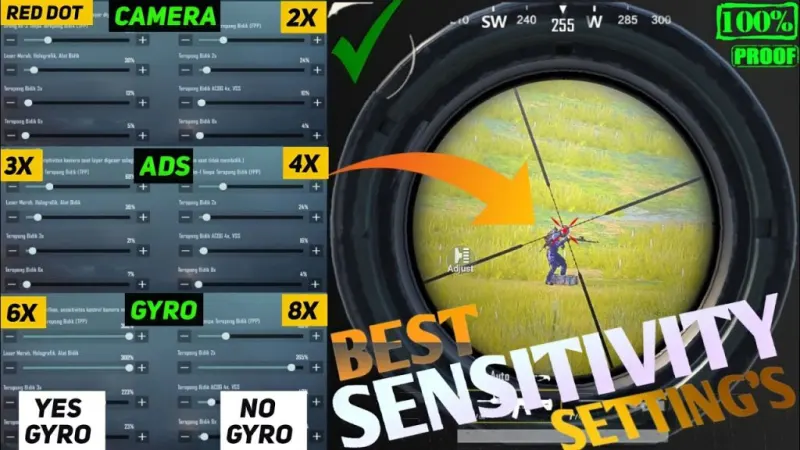
Sensitivity settings play a crucial role in how your character moves and aims in the game. These settings can be customized based on your preferences and playstyle. Here's a breakdown of the sensitivity settings and how they impact gameplay:
- Camera Sensitivity:
- Free Look: This controls how fast your camera moves when you swipe on the screen without aiming down sights (ADS).
- Aim Sensitivity: Adjusts how quickly your aim moves when you're aiming down sights.
- Gyroscope Sensitivity:
- If you use gyroscope aiming, this setting controls how sensitive it is to your device's movements.
- ADS Sensitivity:
- 3x Scope Sensitivity: Specific sensitivity when using a 3x scope.
- 4x Scope Sensitivity: Sensitivity for 4x scopes.
- 6x Scope Sensitivity: For 6x scopes.
- 8x Scope Sensitivity: Fine-tuning for 8x scopes.
- Red Dot, Holographic, and 2x Scope Sensitivity: Custom settings for these sights.
- Vehicle Sensitivity:
- Customize how the vehicle responds to your touch controls.
Finding Your Perfect Settings
Finding the right sensitivity settings is a personal journey. Here are some tips to help you dial in your ideal setup:
- Start Slow:
- If you're unsure, start with lower sensitivity settings and gradually increase them as you get comfortable.
- A lower sensitivity can help with more precise aiming, especially at longer distances.
- Test and Adjust:
- Spend time in the training ground or less crowded areas of the map to test your settings.
- Pay attention to how comfortable you feel with the sensitivity when aiming and moving.
- Consider Your Playstyle:
- Aggressive players might prefer higher sensitivity for quick movements and reactions.
- Stealthy players might benefit from lower sensitivity for precise, calculated shots.
- Find Balance:
- Aim for a balance between camera and ADS sensitivity.
- Your goal is to have smooth, controlled movements both when scanning the environment and aiming at enemies.
- Gyroscope Aiming:
- If you use gyroscope aiming, adjust it to complement your regular sensitivity settings.
- Gyroscope can offer finer adjustments for aiming but may require practice to master.
Additional Tips for Control Mastery
- Custom Layouts: Experiment with custom layouts to find one that suits your hand size and grip style.
- Training Grounds: Use the training grounds to practice shooting, looting, and driving with your chosen sensitivity settings.
- Watch Pro Players: Observing how professional players handle controls and sensitivity can offer valuable insights.
- Regular Adjustments: As you progress and become more skilled, don't hesitate to tweak your settings for improvement.
In conclusion, mastering controls and sensitivity settings in PUBG/BGMI is a continual process of refinement. Understanding how each setting affects your gameplay and finding the right balance for your playstyle is key. Take the time to experiment, practice, and adapt as you strive to become a formidable force on the battlegrounds Download App.
App information
- Version
- 1.0.1
- Requires
- Android 5.0+
- Updated
- May 14, 2023
- Developer
- Samay Technology
- Category
- Tools
- Installs (Google Play)
- 5,000+
- Package
- com.aashishregmi13.pubg_controls_sensi
Download Controls and Sensi(PUBG/BGMI) Latest Version
- Download APK Opens mediafire.com (external site)
- GET IT ONGoogle Play Official Google Play listing · opens play.google.com
Links open the file host in a new tab. ApkZub does not host these files. Scan every APK before installing, and prefer the official store whenever it is available.
How to install an APK file
- Download the APK file using a link in the section above.
- On your Android phone, open Settings → Apps → Special app access → Install unknown apps and allow your browser or file manager.
- Open the downloaded file from your notifications or the Downloads folder and tap Install.
- If the file is an XAPK/APKS bundle or comes with an OBB folder, follow the extra steps in the description above.
- After installing, you can switch the “Install unknown apps” permission off again.







