- Version
- 1.0
- Android
- 5.0+
- Updated
- Nov 29, 2022
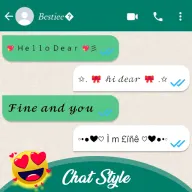
Chat style for WA & fancy font’s application is a cool text generator and stylish font creator or emoji text for WA. Chat style for WA allows you to write a message with a beautiful look. Use font chat style for WA app for better communication with your friends and family and share them on social media. Chat style for WA is easy to use and user-friendly application. Just write text, status, message, or quote and check the various stylish text below and pick the various styles and send them on messaging app directly on this chat style app.
Screenshots


About Chat Styles for WA - Keyboard
Chat style for WA & fancy font’s application is a cool text generator and stylish font creator or emoji text for WA. Chat style for WA allows you to write a message with a beautiful look. Use font chat style for WA app for better communication with your friends and family and share them on social media. Chat style for WA is easy to use and user-friendly application. Just write text, status, message, or quote and check the various stylish text below and pick the various styles and send them on messaging app directly on this chat style app.
Stylish text keyboard like stylish text, text decoration, emoji text style, fancy text generator, glitch text, and text repeater. Chat style for WA provides limitless possibilities to generate stylish text. Chat style is a great app for everyday conversation and gets the perfect elegant fonts for everyone to look at and admire. Stylish text for WA brings you a lot of cool fonts and stylish fonts. The chat style for the WA app helps you to convert normal text into different fancy stylish text. Stylish text can make chat style more attractive. You can also create stylish bio statuses and share them with your loved ones over social media.
Stylish people like to change the app font style for android phones to make typing style attractive. Now test style keyboard app has become necessary for stylish text typing with friends. It's a text-free chat app for changing text messages into multi-fonts styles. You may use a style text app to make word font and style better-looking for new style font users. Moreover with the help of chat style & fonts keyboard you can send the same text multiple times without typing text again and again.
Features of chat style:
Create cool stylish letters
Font’s decoration to make your chat more attractive
Choose special fonts to make your text beautiful
Generate stylish messages, different text fonts, text decoration, and unique fonts and generate cool WA conversation
Use font’s decoration, and stylish messages and enjoy stylish life
Status messages for the social platform
Generate cool bio for social media
Easily copy or share to any chat app
Use font’s arts with cool symbol text
Provide a collection of special symbols
Use the repeater feature you can send the same text multiple times without retyping.
Stylish fonts & keyboard is a great app for everyday conversation and getting perfect elegant fonts for everyone to look at and admire. Download and enjoy the stylish font keyboard app.
App information
- Version
- 1.0
- Requires
- Android 5.0+
- Updated
- Nov 29, 2022
- Developer
- Tahir apps 1234
- Category
- Entertainment
- Price
- Free
- Installs (Google Play)
- 100+
- Package
- com.wa.fontstyles.kb
Download Chat Styles for WA - Keyboard
- Download APK Opens mediafire.com (external site)
- GET IT ONGoogle Play Official Google Play listing · opens play.google.com
Links open the file host in a new tab. ApkZub does not host these files. Scan every APK before installing, and prefer the official store whenever it is available.
How to install an APK file
- Download the APK file using a link in the section above.
- On your Android phone, open Settings → Apps → Special app access → Install unknown apps and allow your browser or file manager.
- Open the downloaded file from your notifications or the Downloads folder and tap Install.
- If the file is an XAPK/APKS bundle or comes with an OBB folder, follow the extra steps in the description above.
- After installing, you can switch the “Install unknown apps” permission off again.