- Version
- 1.4.8
- Android
- 4.4+
- Updated
- Mar 21, 2023
Enjoy better gameplay and game graphics with the GFX tool! Configure game resolution for maximum gaming experience with the GFX Tool - Game Booster! Our application is a unique solution for the best gaming experience.
Screenshots


What’s new in v1.4.8
* Bugs Fixes and optimizations
About GFX Tool: The Ultimate Free Fire Game Booster
In the world of mobile gaming, titles like Garena Free Fire have taken the industry by storm. With millions of players worldwide, this battle royale game offers intense action and strategy on the go. However, not all devices can handle the game's demanding graphics requirements, leading to suboptimal performance and gameplay experiences. This is where GFX Tool comes into play, offering a powerful solution to enhance your Free Fire gaming sessions.
What is GFX Tool?
GFX Tool is a game booster specifically designed for Free Fire. Developed by a team of gaming enthusiasts, this tool is crafted to optimize the game's graphics settings for smoother performance on a variety of devices. Whether you're using a mid-range phone or a top-tier gaming device, GFX Tool allows you to unlock the full potential of Free Fire by customizing several aspects of the game's visuals.
How Does it Work?
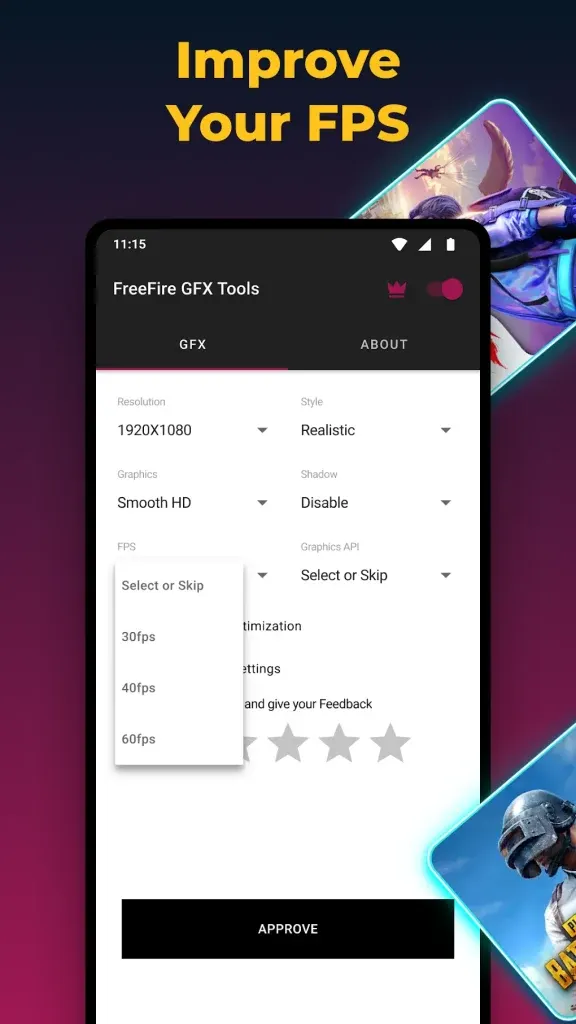
The primary function of GFX Tool is to modify the game's graphics settings beyond what is offered in the game's menu. When you launch Free Fire through GFX Tool, you gain access to a range of customization options. These include:
- Resolution: Adjust the resolution to match your device's screen. Lower resolutions can significantly improve performance on older or less powerful devices.
- Graphics: Fine-tune the graphics quality, choosing from options like smooth, balanced, HD, HDR, and more. This lets you find the right balance between visual fidelity and performance.
- FPS (Frames Per Second): Unlock higher FPS options, such as 60 or even 90 FPS, providing smoother gameplay and more responsive controls.
Advantages of Using GFX Tool
- Improved Performance: By lowering the graphics settings or adjusting the resolution, GFX Tool can make Free Fire run more smoothly on devices that struggle with the default settings.
- Better Visuals: Conversely, if you have a high-end device, you can use GFX Tool to push the graphics settings to their maximum, enjoying stunning visuals and details.
- Customization: GFX Tool puts you in control. You can experiment with different settings to find the perfect balance between performance and visuals that suits your preferences.
- Reduced Lag: One of the most frustrating aspects of mobile gaming is lag. GFX Tool helps reduce this by optimizing the game's settings for your specific device.
- Easy to Use: The interface of GFX Tool is user-friendly and intuitive. You don't need technical expertise to adjust the settings; it's as simple as selecting options from a menu.
Is it Safe to Use?
It's important to note that GFX Tool operates within the game's parameters and doesn't modify the game files themselves. This means it is generally safe to use, and it's widely used by the Free Fire community. However, as with any third-party tool, there are some considerations:
- Official Support: The developers of Free Fire do not officially endorse GFX Tool, so there's always a slight risk of using third-party software.
- Bans: While rare, there have been instances of players receiving temporary bans for using GFX Tool. This is more common when using extreme settings that may give unfair advantages.
How to Get GFX Tool
GFX Tool is available for download on Android devices through the Google Play Store. Simply search for "GFX Tool for Free Fire" and download it like any other app. It's important to choose a reputable version of the tool to ensure safety and compatibility with the game Install.
In Conclusion
For Free Fire enthusiasts looking to enhance their gaming experience, GFX Tool provides a powerful solution. Whether you're aiming for smoother performance on a budget device or eye-popping graphics on a flagship phone, this tool offers the customization you need. Just remember to use it responsibly and be aware of the potential risks associated with third-party software. With GFX Tool, you can take your Free Fire gameplay to the next level, immersing yourself in the fast-paced action without worrying about performance limitations.
App information
- Version
- 1.4.8
- Requires
- Android 4.4+
- Updated
- Mar 21, 2023
- Developer
- ZipoApps
- Category
- Tools
- Price
- Free
- Installs (Google Play)
- 5,000,000+
- Package
- com.bshowinc.gfxtool
Download GFX Tool: The Ultimate Free Fire Game Booster
- GET IT ONGoogle Play Official Google Play listing · opens play.google.com
Links open the file host in a new tab. ApkZub does not host these files. Scan every APK before installing, and prefer the official store whenever it is available.
How to install an APK file
- Download the APK file using a link in the section above.
- On your Android phone, open Settings → Apps → Special app access → Install unknown apps and allow your browser or file manager.
- Open the downloaded file from your notifications or the Downloads folder and tap Install.
- If the file is an XAPK/APKS bundle or comes with an OBB folder, follow the extra steps in the description above.
- After installing, you can switch the “Install unknown apps” permission off again.







